The mouse was dead. Now how to use a Mac?

From this no one is immune: sometimes the wireless mouse suddenly discharged battery, break in two wired cable, and trackpad suddenly stops responding. And as luck would have it we now have there are some important things which should be implemented urgently. Geeks, of course, will immediately give a link to the page with the full list of hotkeys, but that is not why we bought the Mac, in order to again become the red-eyed nerds. We need a mouse interface, even when the mouse does well is not available. In General, read the instructions on how to use the mouse even in the absence thereof.
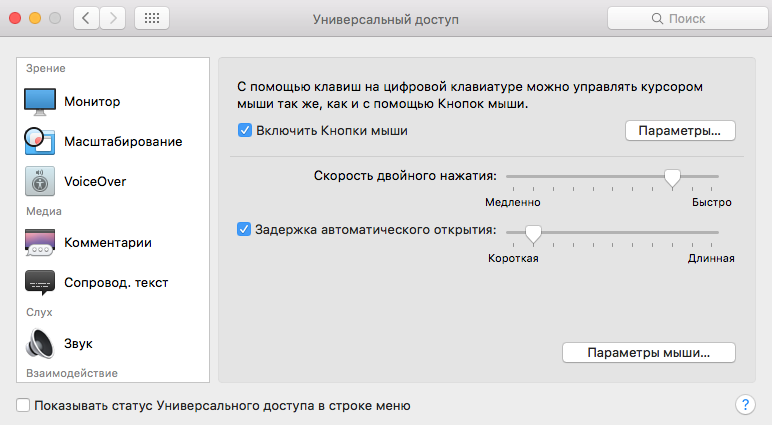
First of all, go to System preferences Mac: they are invoked from the menu that appears when you click on the Apple in the upper left corner of the screen. Next, select Universal access — Mouse and trackpad.
First, you need to tick “Enable mouse button” and then click “Options”.
In the resulting window you can adjust the speed of cursor movement, we recommend to set the highest. We also recommend you to tick “Press the Option key five times to turn on/off mouse buttons”. Where and what are you going to stick if the mouse will suddenly be discarded? As a reserve airfield in the form of five-time pressing Option to start the mouse emulator can very useful.
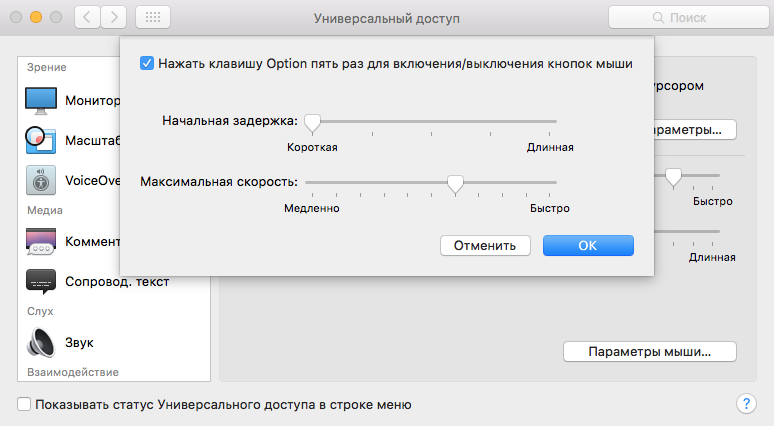
And now the magic begins: five times press the Option key (aka Alt) or include a check in the right place System settings, then the mouse cursor can be controlled with the keyboard, and in eight directions. In particular, to move using the following keys: 7, 8, 9, 4, 6, 1, 2 and 3 on the numeric block or 7, 8, 9, U, O, J, K and L on the letter block.
To click, press the numeric block 5, alpha I. To hold the left mouse button, respectively, press 0 (zero) or M (Latin). To release the mouse “.” on numeric keyboard or the same symbol on the letter. Right click is emulated by simultaneous pressing Ctrl and 5 with the numeric keypad on a desktop computer or Fn-Ctrl-I on laptop.
Of course, to control the mouse pointer so much less convenient than the traditional way, but in an emergency situation will come any crutches. Add this material to your bookmarks in case of occurrence of similar incident. And just in case, to enable calling emulator mouse by pressing Option five times. What the hell.